📃 List
This page contains detailed information about all payments received from clients, including the amount, date, payment method, and associated invoices.
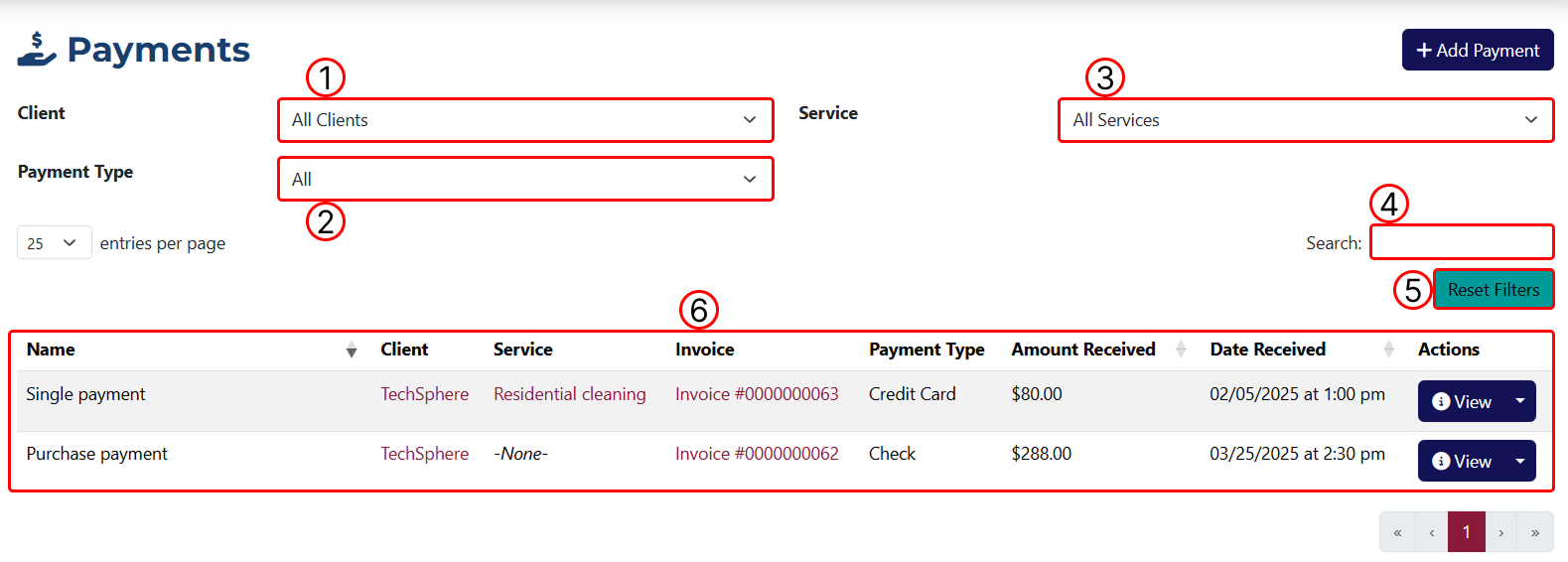
1 This dropdown allows you to filter the results by client. You will see all clients you've added to the system.
2 This dropdown allows you to filter the results by payment type. These options can be added or modified in the system settings.
3 This dropdown allows you to filter the results by service. It contains all the services you've created in the system.
4 Use this field to enter a keyword for filtering the results.
5 Using this button, you can remove all applied filters.
6 A table displaying all generated payments before and after filters are applied.
If the payment is linked to an invoice, you will see its number in the Invoice column along with a link to the invoice overview page.

1 Opens the Payment Overview page.
2 Opens the Payment Edit page.
3 This button allows you to create a duplicate of the payment.
4 This button allows you to delete the payment. After clicking the button, a pop-up will appear to confirm or cancel the deletion.